name: inverse layout: true class: middle place: Datascript kubernetes_version: 1.29.4 kubernetes_version_short: 1.29 email: tom@6shore.net author: Tomáš Kukrál examples: https://gitlab.com/6shore.net/kubernetes-examples kad_repo: https://gitlab.com/6shore.net/kad.git username: glass password: paper --- class: center # Kubernetes training ## {{ author }} {{ place }} --- class: center ## About me .center[ ### {{ author }} [{{ email }}](mailto:{{ email }}) [linkedin.com/in/tomaskukral](https://www.linkedin.com/in/tomaskukral/) ] ??? .right-column[  ] --- # Agenda .lc[ * Introduction * Containers and Docker * Docker * PID1 * Container orchestration ] .rc[ * Kubernetes * Basic resources * `kubectl` * Workload * Exposing services * Volumes * Configuration management * Resource management * Liveness and readiness * Container lifecycle * Control plane * Ingress * Prometheus * Volumes and claims ] --- class: center # Your expectations? --- ## Course objectives * use containers effectively * know pros & cons of containers * build container images * understand Kubernetes architecture * deploy application in Kubernetes * control ingress traffic with Traefik * configuration and secret management * monitoring, health checks Feel free to ask any time. --- ## Lab environment * Virtual machines ```jinja Host: c{{ N }}.s8k.cz User: {{ username }} Pass: {{ password }} ``` .lc[ Each student have own virtual machine. * Public cloud * Amazon VPC VMs for everyone * Requirements * Internet connectivity * SSH client [PuTTY](https://www.chiark.greenend.org.uk/~sgtatham/putty/latest.html) * Web browser * _Git client_ ] .rc[ * cN.s8k.cz (SSH) * wildcard `*.cN.s8k.cz` * [grafana.cN.s8k.cz](http://grafana.cN.s8k.cz) * [kad.cN.s8k.cz](http://kad.cN.s8k.cz) * [prometheus.cN.s8k.cz](http://prometheus.cN.s8k.cz) * [traefik.cN.s8k.cz](http://traefik.cN.s8k.cz) ] --- # Lab - prepare for the lab * Download SSH client ([PuTTY](https://www.chiark.greenend.org.uk/~sgtatham/putty/latest.html)) * Connect to your lab (password is `{{ password }}`) `ssh {{ username }}@c{{ N }}.s8k.cz` * Run all commands as root `sudo -i` * Open course materials * https://slides.s8k.cz * {{ examples }} --- # Introduction to containers * Container concepts * Overview of container technologies --- # Architectures * Traditional: Application run on baremetal server * isolated HW * expensive equipment * Virtualized: Baremetal server is simple and VMs are running on top of it * decoupled from HW * multiple kernel, HW isolated * Containerized: Application is running in containers * shared kernel * simplified management * expensive staff ??? * Code pipelines * Infrastructure as a Code * Easier development * Microservices * Easy rollback code pipeline - focus on shipping the code infrastructure as a code - describe infrastructure and use it to run code --- .rc[ # Lab - cgroup commands Try these commands: ```bash systemd-cgls systemd-cgtop ``` ] .lc[ ### cgroups * in kernel since 2008 (2.6.24) * created by Google * resource limitations * resource prioritization * accounting * state control (frozen, restarted) ] ??? https://en.wikipedia.org/wiki/Cgroups * collection of processes * Connect to lab and try these commands * browsers cgroup * /etc/cgconfig.conf --- #### Linux Namespaces Provide resource isolation by hiding other resources .center[ Namespace | Purpose -----------|------------ mnt | Mount points pid | Provide independent process IDs net | Networking stack ipc | Inter-process communication uts | Provide different host and domain names uid | Privilege isolation and user identification cgroup | Prevent leaking control-group ] ??? * provides unique view for resources in namespace * pid: first process in namespace is PID 1, nested * net: only network by default, interface in 1 namespace, can be moved, ip addr routing tables, sockets, conn table, firewall * uid: nested, administrative right without privileged process mapping table, uid mapping table * time namespace cgroup: merged to 4.6 --- ## OCI [Open Container Initiative](https://www.opencontainers.org/) Project to design open standards for Linux containers and virtualization. Contain specification for containers: * [runtime-spec](http://www.github.com/opencontainers/runtime-spec) * [image-spec](http://www.github.com/opencontainers/image-spec) ??? * https://github.com/opencontainers/image-spec/blob/master/config.md * https://github.com/projectatomic/skopeo runtime specification outlines how to run a "filesystem bundle" that is unpacked on disk --- ## Container components ### Image * elementary block of a container * contains files * similar purpose like image for VM * stores files (not filesystem) - like tar * read-only * share read-only layers * ways to build image * Dockerfile * `docker commit` * `docker import` * `buildah` - [projectatomic/buildah](https://github.com/projectatomic/buildah) --- #### Image names .center[ ``` registry.6shore.net:8000/tomkukral/freezer:2.3-rc0 |_________________| |__| |_______| |_____| |_____| registry port dir name tag ``` ] * default **registry** is `docker.io` (references [Docker Hub](https://hub.docker.com/)) * default **tag** is `latest` ??? * --add-registry on RHEL/Fedora - /etc/sysconfig/docker * https://access.redhat.com/articles/1354823 --- ### Container Container is "process" running in an isolated environment. .small[ ```bash # docker ps CONTAINER ID IMAGE COMMAND CREATED STATUS PORTS NAMES ee984e0ade27 spotify "spotify" 7 hours ago Up 7 hours spotify 9d6c4eb26908 mariadb "docker-entrypoint.sh" 7 days ago Up 32 hours 3306/tcp fran_db_1 6172469c1af8 rabbitmq "docker-entrypoint.sh" 2 weeks ago Up 32 hours 4369/tcp fran_mq_1 ``` ] * Container storage is ephemeral * You can't change container configuration --- # Lab - backup data from container 1. Start MySQL database in container `docker run --name db -d -ti -e MYSQL_ALLOW_EMPTY_PASSWORD=1 docker.io/mariadb` 1. Create database `workshop` Command to execute in container: `mariadb -u root -e "CREATE DATABASE workshop"` 1. List databases SQL command `SHOW DATABASES` 1. Backup directory `/var/lib/mysql/` from container to host 1. What is the size of this backup? 1. Can you find another way to backup database? --- ## Fun with PID 1 .lc[ * Container have it's own PID namespaces * PID 1 process is special, usually `init` * Please don't run init in containers * Is responsible for: * collection zombies * handling signals * `docker run --init` is a (bad) way * Running scripts in containers - make sure exec is used * Bad: `nginx` * Good: `exec nginx` * Shell form vs exec form * Shell: `CMD /start.sh` * Exec: `CMD ["/start.sh"]` ] .rc[ ### Wrong ```bash PID COMMAND 1 /bin/bash /start.sh 8 nginx: master process nginx -g daemon off; 9 \_ nginx: worker process ``` ### Right ```bash PID COMMAND 1 nginx: master process nginx -g daemon off; 8 nginx: worker process ``` ] --- # Lab - PID1 1. Build image from `pid1` directory 1. Start container and execute `ps aux` in this container 1. Which process have PID 1? Is it `nginx`? 1. Use `time docker stop {{ container }}` to stop container and observe **total** time to stop containers 1. Fix issue with PID 1 (`nginx` process should have PID 1), and repeat from point **1** 1. How long does it take to stop container with proper PID? --- ## Networking * Provide: * communication between containers * ingress traffic * egress traffic * port mapping * Default network is bridge * `docker0` bridge will choose unused subnet - risk of IP collision * Uses iptables with NAT (MASQUERADE) --- .center[.full[ 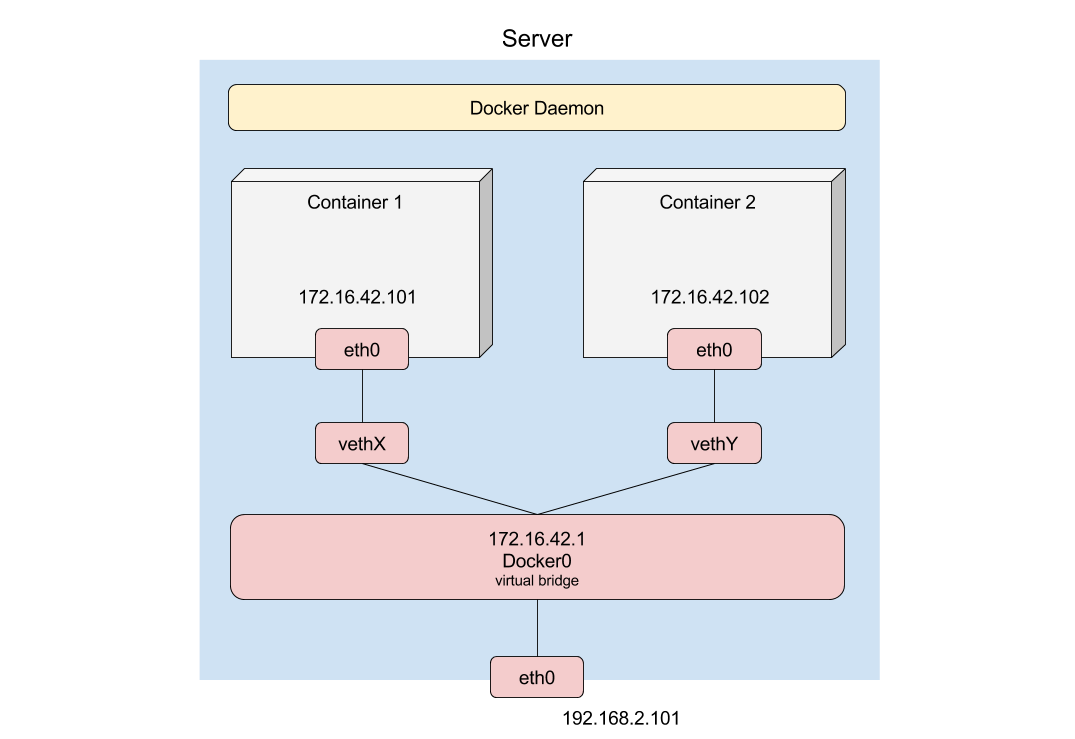 ]] --- ## Security * Difference between `root` in container and `root` at host * Securing access to Docker daemon ```bash docker run --rm -ti -v /:/hostfs/ ubuntu bash ``` ```bash docker run --rm -ti -v /run/systemd/:/run/systemd/ -v /var/run:/var/run ubuntu bash ``` ??? systemd-sysv --- class: center # Docker API == root on host --- # Lab - trusted images 1. Pull image `docker.io/tomkukral/dirty-debian` 1. Tag this image as `debian` 1. Run `bash` in this image ```bash docker run --rm -ti -e PASSWORD=mypassword debian bash ``` --- # Container orchestration Container orchestaration is a complex task. * Services are running and healthy * Containers are running, enough of replicas * Host are fine * Network is working --- Automated arrangement, coordination and management of complex computer system, middleware and services. Dependencies and external resources must be taken into account. .center[ .full[ 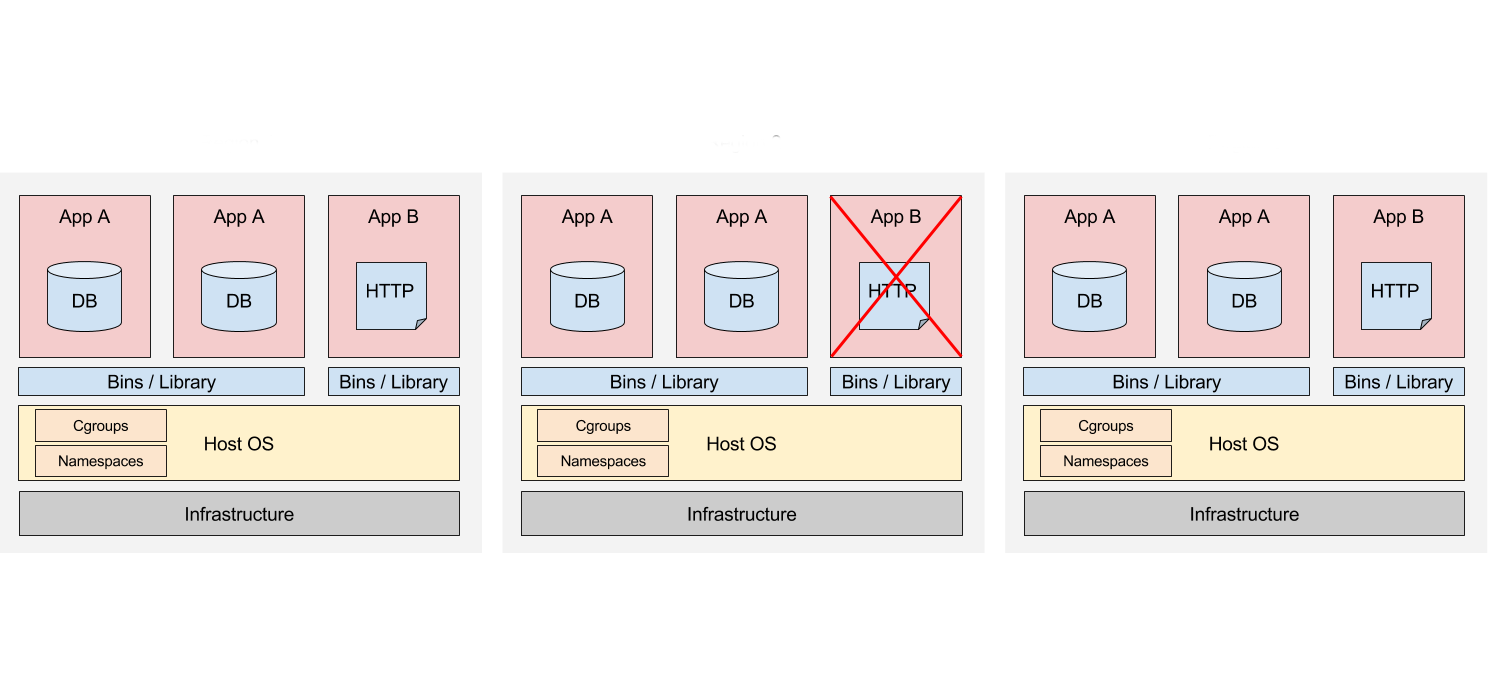 ]] --- ## Orchestration Allow moving from host-centric to container-centric infrastructure. .lc[ * container parameters * number of replicas * (anti)affinities * networking * services * resource allocation * configuration management ] .rc[ * monitoring and healing * load balancing * updates * daily tasks (backups) * scaling - automated and manual ] --- ## Network Manage container network and cooperation with underlying infrastructure. * Isolation vs connection * Rate limiting, firewall * Service discovery * Network policies * Load balancing --- ## Storage Some containers need to have persistent storage, regarding on current container placement. Storage and compute decoupling is necessary. Persistent storage is called volume and this volume is mounted into the container. We can mount filesystem to container or provide block device. Access to container storage should be provided by orchestration engine - no storage software in containers. ``` /dev/rbd0 on /var/lib/kubelet/plugins/kubernetes.io/rbd/rbd/kube-image-pv07 ``` --- class: right  Κυβερνήτης (kubernétés) - captain, skipper, pilot --- # Kubernetes Kubernetes is system for managing containers across multiple nodes, at scale. * Lab is using {{ kubernetes_version }} * released July 2015, [first commit](https://github.com/kubernetes/kubernetes/commit/2c4b3a562ce34cddc3f8218a2c4d11c7310e6d56) ``` commit 2c4b3a562ce34cddc3f8218a2c4d11c7310e6d56 Author: Joe Beda <joe.github@bedafamily.com> Date: Fri Jun 6 16:40:48 2014 -0700 ``` * Based on [Borg](http://blog.kubernetes.io/2015/04/borg-predecessor-to-kubernetes.html) * Abstraction of containers and resources ??? * I'm using from 1.0.3 - fall 2015 --- ## Architecture .center[ .full[ 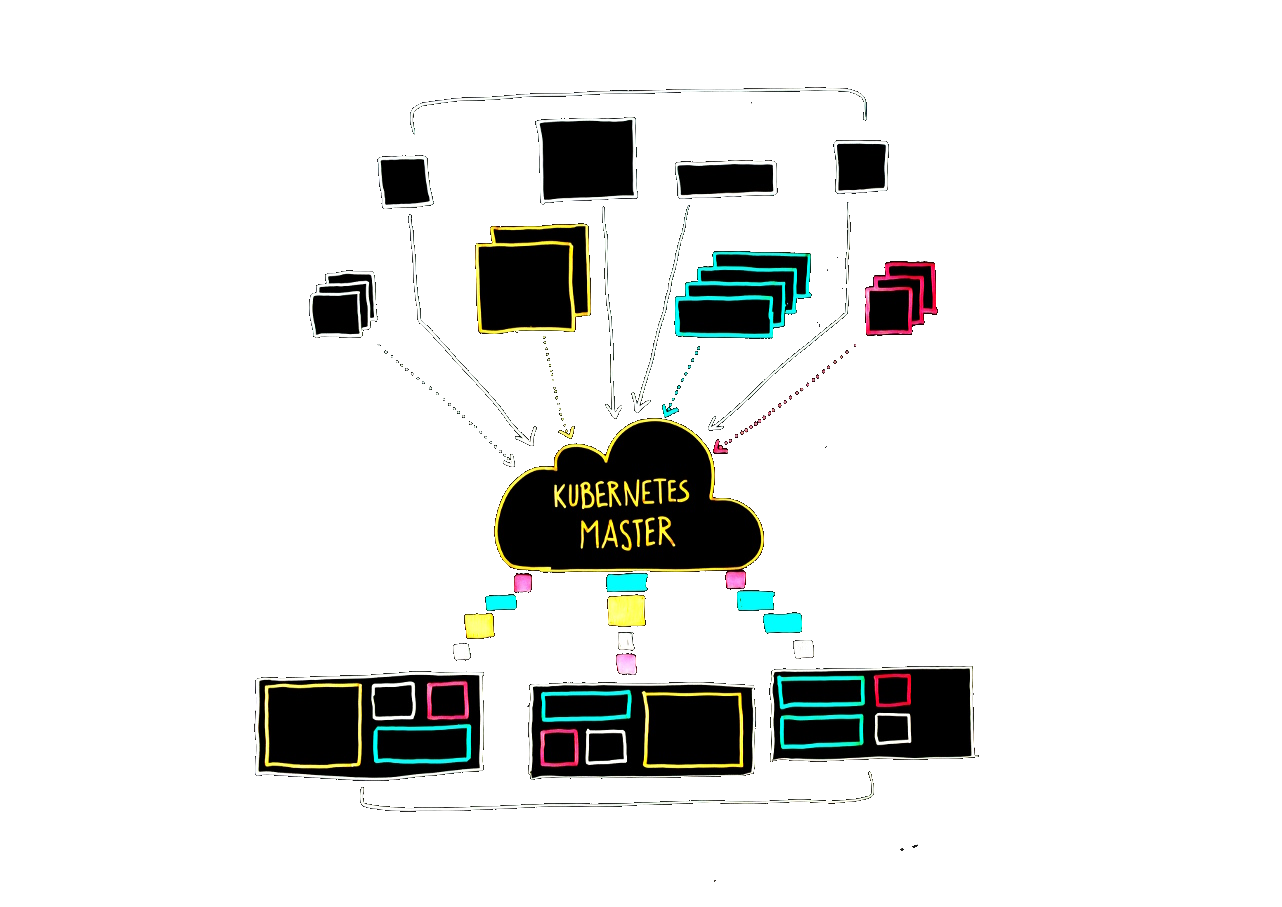 ]] --- ## Resources * **Node** is machine running containers * **Pod** is group of one or more containers. Containers in pod share the storage, network and runtime options. It is't possible to divide pod. * **Label**, **Selector** Labels are use to mark resources and selector find resources according to labels. * **Deployment**, **ReplicaSet**, ~~ReplicationController~~ Defines how containers (pods) should be running and how many of them should be active. --- * **Service** Routes traffic from to containers and provide fixed endpoint and address. * **Endpoint** Socket (IP and port) of available service, usually pod IP * **ConfigMap**, **Secret** Provide standardized configuration and password management. * **DaemonSet** Is special type of pod. DaemonSet is running on every available node. --- * **Job**, **CronJob** Make job (by running pod), ensure it will successfully terminate and save output. * **PersitentVolume**, **PVC**, **StorageClass** Provide storages for pods. * **StatefulSet** Provide pods with unique identity, sequential scaling and auto-allocated fixed storage. * **Namespace** Namespace is used to group and isolate Kubernetes resources. Quotas can be applied to namespaces. --- ## Kubernetes resources made simple .lc[ .full[ 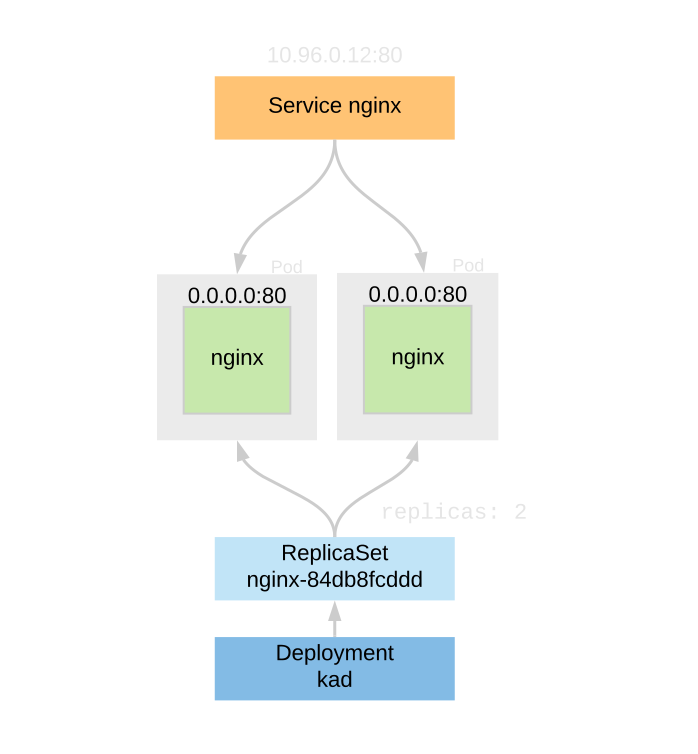 ] ] .rc[ .small[ ```bash kubectl get all NAME READY UP-TO-DATE AVAILABLE AGE deployment.apps/nginx 2/2 2 2 114m NAME DESIRED CURRENT READY replicaset.apps/nginx-84db8fcddd 2 2 2 NAME READY STATUS RESTARTS AGE pod/nginx-84db8fcddd-lxr98 1/1 Running 1 114m pod/nginx-84db8fcddd-w8hqs 1/1 Running 1 114m NAME TYPE CLUSTER-IP EXTERNAL-IP PORT(S) service/nginx ClusterIP 10.96.0.12 <none> 80/TCP ``` ] ] * Deployment - `deploy` * ReplicaSet - `rs` * Pod - `po` * Service - `svc` --- ## `kubectl` .lc[ ``` kubectl [commands] get, describe, create, delete, scale, stop, expose, label, edit kubectl get po kubectl create -f file.yml kubectl scale deploy myapp --replicas=10 kubectl get no,deploy,svc kubectl get all -o yaml -o wide -o=custom-columns=NAME:.metadata.name,AWS-INSTANCE:.spec.nodeName -v10 ``` ] .rc[ * [Linux binary](https://storage.googleapis.com/kubernetes-release/release/v{{ kubernetes_version }}/bin/linux/amd64/kubectl) * [macOS binary](https://storage.googleapis.com/kubernetes-release/release/v{{ kubernetes_version }}/bin/darwin/amd64/kubectl) * [Windows binary](https://storage.googleapis.com/kubernetes-release/release/v{{ kubernetes_version }}/bin/windows/amd64/kubectl.exe) * Save `kubectl` to PATH (e.g. `/usr/local/bin`) ] --- ```yaml apiVersion: v1 kind: Config *clusters: - cluster: certificate-authority-data: LS0..VtLQo= server: https://apiserver.company.com:6443 name: training *contexts: - context: cluster: traning user: training namespace: ns2 name: training current-context: training preferences: {} *users: - name: training user: username: admin password: password ``` `~/.kube/config` --- ## Node - `no` Node is machine running containers. ```yaml apiVersion: v1 kind: Node metadata: annotations: projectcalico.org/IPv4Address: 10.0.0.10/24 labels: beta.kubernetes.io/os: linux failure-domain.beta.kubernetes.io/region: eu-central-1 kubernetes.io/hostname: ip-10-0-0-10 name: ip-10-0-0-10 spec: podCIDR: 192.168.0.0/24 status: addresses: - address: 10.0.0.10 type: InternalIP ... ``` `kubectl get no` --- ```bash kubectl --kubeconfig ~/ves/kubeconfig/demo-gc get no NAME STATUS ROLES AGE VERSION aks-agentpool-42065748-0 Ready agent 24d v{{ kubernetes_version }} aks-agentpool-42065748-1 Ready agent 24d v{{ kubernetes_version }} aks-agentpool-42065748-2 Ready agent 24d v{{ kubernetes_version }} aks-agentpool-42065748-3 Ready agent 24d v{{ kubernetes_version }} aks-agentpool-42065748-4 Ready agent 24d v{{ kubernetes_version }} aks-agentpool-42065748-5 Ready agent 24d v{{ kubernetes_version }} aks-agentpool-42065748-6 Ready agent 24d v{{ kubernetes_version }} aks-agentpool-42065748-8 Ready agent 24d v{{ kubernetes_version }} ``` --- .lc[ ## Pod - `po` Pod is a group of one or more containers. ```yaml apiVersion: v1 kind: Pod metadata: name: nginx spec: containers: - name: nginx image: nginx:1.7.9 ports: - containerPort: 80 ``` `kubectl get po` ] .rc[ ## Deployment - `deploy` ```yaml apiVersion: apps/v1 kind: Deployment metadata: name: nginx spec: replicas: 2 selector: matchLabels: `app: nginx` template: metadata: labels: `app: nginx` spec: containers: - name: nginx image: nginx:1.7.9 ports: - containerPort: 80 ``` `kubectl get deploy` ] --- ## Service - `svc` ```yaml apiVersion: v1 kind: Service metadata: name: nginx spec: selector: app: nginx ports: - protocol: TCP port: 80 ``` `kubectl get svc` --- ```yaml kubectl describe svc nginx Name: nginx Namespace: default Labels: <none> Annotations: <none> Selector: app=nginx Type: ClusterIP *IP: 10.96.0.176 Port: <unset> 80/TCP TargetPort: 80/TCP *Endpoints: 192.168.0.8:80,192.168.1.10:80 Session Affinity: None Events: <none> ``` --- # Lab - discover Kubernetes cluster 1. Download kubeconfig file to `$HOME/.kube/config` (to your machine) * [http://cN.s8k.cz/kubeconfig/admin](http://cN.s8k.cz/kubeconfig/admin) (replace `N` with your stack number) * User: `glass`, password `paper` 1. Install [kubectl tool](https://kubernetes.io/docs/tasks/tools/install-kubectl/#install-kubectl-binary-using-curl) on your machine (if you can), already installed in VM 1. Verify connection to cluster (e.g. `kubectl get po`, `kubectl get no`) 1. **How many nodes** is in this cluster? 1. Which **kernel version** are nodes running? --- ``` kubectl describe no Name: ip-10-0-0-10.eu-central-1.compute.internal Roles: <none> Labels: beta.kubernetes.io/arch=amd64 beta.kubernetes.io/instance-type=t3.medium ... System Info: Machine ID: ec21b6f32c2991b3c07bf347ac66307b System UUID: EC21B6F3-2C29-91B3-C07B-F347AC66307B Boot ID: 4cff5251-f4ba-4280-949c-bfb437136ec0 Kernel Version: 5.15.0-1060-aws OS Image: Ubuntu 22.04 LTS Operating System: linux Architecture: amd64 Container Runtime Version: cri-o://1.22.5 Kubelet Version: v{{ kubernetes_version }} Kube-Proxy Version: v{{ kubernetes_version }} ... ``` --- ## First application Elementary application consists of *deployment* and *service*. Best practise is to store resources locally in YAML files(s) and enforce them in Kubernetes. * Create YAML files (e.g. `deploy.yml`) on your machine. Example is in [nginx/](https://gitlab.com/6shore.net/kubernetes-examples/-/tree/master/nginx) directory. * Enforce resource (create or update) it ```bash kubectl apply -f deploy.yml deployment.apps/nginx created ``` * Verify resource exists ```bash kubectl get deployment NAME READY UP-TO-DATE AVAILABLE AGE nginx 2/2 2 2 23s ``` * Resources can be deleted by name ```bash kubectl delete deployment nginx deployment.extensions "nginx" deleted ``` --- .lc[ ```yaml # Service definition apiVersion: v1 kind: Service metadata: name: nginx spec: selector: app: nginx ports: - protocol: TCP port: 80 ``` ] .rc[ ```yaml # Deployment definition apiVersion: apps/v1 kind: Deployment metadata: name: nginx spec: replicas: 2 selector: matchLabels: app: nginx template: metadata: labels: app: nginx spec: containers: - name: nginx image: nginx:1.13.2 ports: ``` ] --- * Delete all resources defined in file ```bash kubectl delete -f resources.yml service "nginx" deleted deployment.apps "nginx" deleted ``` * Get all information about resource ```bash kubectl get deploy nginx -o yaml ``` * Human-readable resource description ```bash kubectl describe po nginx-8577c65ffc-4pjpw ``` * Read container logs ```bash kubectl logs nginx-8577c65ffc-4pjpw ``` * Run command in container ```bash kubectl exec -ti nginx-8577c65ffc-4pjpw bash ``` --- # Lab - basic workload operations 1. Delete one of `nginx` pods and check how many pods is running 1. Delete deployment `nginx` and service `nginx` ```bash kubectl delete deploy nginx kubectl delete svc nginx ``` 1. Use existing `nginx.yml` to create deployments and services 1. Create new deployment named `First-test` ... Is it working? [Help](https://kubernetes.io/docs/concepts/overview/working-with-objects/names/) 1. Create deployment for simple pod with `nginx` container, 3 replicas 1. Scale deployment to `4` replicas 1. What is the IP of your service? You can run `kubectl` command in VM in case you can't install it locally. Use `kubect describe svc service_name` and check that your service have endpoints. [nginx/nginx.yml](https://gitlab.com/6shore.net/kubernetes-examples/-/blob/master/nginx/nginx.yml) can be used as a reference. --- ## Accessing the services * **ClusterIP** is internal IP, for internal services * `ClusterIP ⇝ Pod IP` * **NodePort** opens port on **all** nodes in cluster * `NodePort ⇝ Cluster IP ⇝ Pod IP` * **LoadBalancer** service uses external load balancer * `external LB ⇝ NodePort ⇝ Cluster IP ⇝ Pod IP` ```yaml apiVersion: v1 kind: Service metadata: name: nginx spec: `type: LoadBalancer` selector: app: nginx ports: - protocol: TCP port: 80 ``` --- # Lab - NodePort service 1. Change your service to type **NodePort** 1. Try to connect to service via node public IP 1. Node IP can be obtained from `kubectl get no -o wide` * `c{{ N }}.s8k.cz` 1. NodePorts are randomly assigned from port range *30000-32767* --- # Lab - LoadBalancer service 1. Change your service to type **LoadBalancer** 1. Use `kubectl get svc -o wide` to find external IP for your service 1. Try to connect this service 1. Use `kubectl describe svc` to check whether you service is ready It can take a few minutes to configure external load balancer. --- ## Kubectl proxy .lc[ `kubectl proxy` is very easy way to access Kubernetes API * Working `kubectl` is required, including `kubeconfig` * Don't use for production, only for debugging * Local port is unauthenticated * Limited to localhost by default * Can be used to forward to services ```bash curl localhost:8001/version { "major": "1", "minor": "26", "gitVersion": "v{{ kubernetes_version }}", "gitCommit": "f5743093fd1c663", "gitTreeState": "clean", "buildDate": "2024-05-13 13:32:58Z", "goVersion": "go1.15", "compiler": "gc", "platform": "linux/amd64" } ``` ] .rc[ .center[.full[ 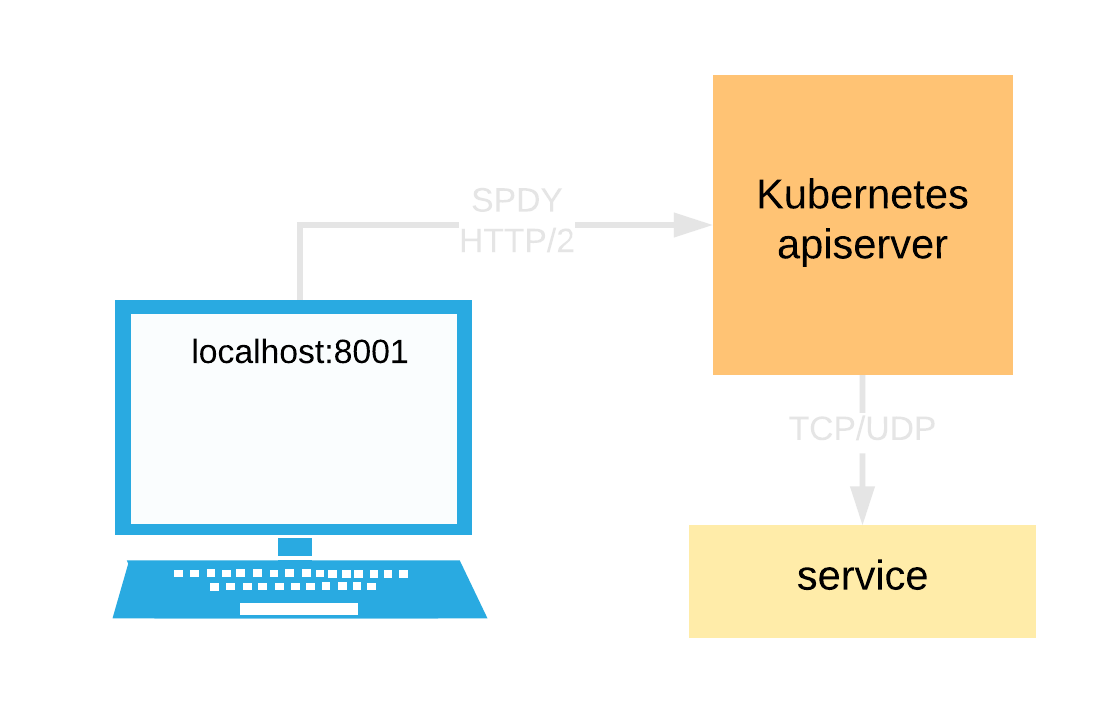 ]] ] --- # Lab - Debugging cluster services 1. Run `kubectl proxy` on your machine, it will open socket on [127.0.0.1:8001](http://127.0.0.1:8001) * [/version](http://127.0.0.1:8001/version) * [/metrics](http://127.0.0.1:8001/metrics) * [/api/v1/namespaces/default/services/nginx/proxy/](http://127.0.0.1:8001/api/v1/namespaces/default/services/nginx/proxy/) 1. `kubectl port-forward {{pod_name}} local_port:pod_port` 1. `kubectl port-forward svc/{{svc_name}} local_port:pod_port` --- ## Configuration and secrets Configuration can be passed to containes in 3 ways: * Environment variable * Command option * Configuration file It can be static (in YAML file), from configMap or secret. .left-column[ ```yaml apiVersion: v1 kind: ConfigMap metadata: name: kad namespace: kad data: configuration: | abc: 123 rotation: left color: red ``` ] .right-column[ ```yaml apiVersion: v1 kind: Secret metadata: name: credentials namespace: kad type: Opaque stringData: username: glass password: paper ``` `echo -n 'workshopSD' | base64` ] --- ### Environment variable .left-column[ * Static ```yaml - image: docker.io/tomkukral/kad env: - name: REDIS_SERVER value: localhost:6379 ``` * from ConfigMap ```yaml - image: docker.io/tomkukral/kad env: - name: COLOR valueFrom: configMapKeyRef: name: kad key: color ``` ] .right-column[ * from Secret ```yaml - image: docker.io/tomkukral/kad env: - name: USERNAME valueFrom: secretKeyRef: name: credentials key: username ``` ] --- ### Command option Command changes `ENTRYPOINT`, args changes `CMD` ```yaml - image: docker.io/tomkukral/kad * command: ["/bin/kad", "--color", "$(COLOR)"] env: - name: COLOR valueFrom: configMapKeyRef: name: kad key: color - name: USERNAME valueFrom: secretKeyRef: name: credentials key: username ``` --- ### Configuration file .lc[ ```yaml apiVersion: v1 kind: ConfigMap metadata: name: kad namespace: kad data: `filecontent`: | Lorem ipsum dolor sit amet, consectetur adipiscing elit. Phasellus sodales sem ... color: red ``` Mount file containing `filecontent` to `/etc/kad/config.yml` ] .rc[ ```yaml apiVersion: apps/v1 kind: Deployment metadata: name: kad spec: ... spec: containers: - name: kad image: docker.io/tomkukral/kad volumeMounts: - name: config mountPath: /etc/kad/ volumes: - name: config configMap: name: kad items: - key: `filecontent` path: config.yml ``` ] --- ## Using namespaces Namespace is logical group of resources and it can be controller by RBAC and quotas. `kubectl` uses `default` namespace when not defined. .rc[ ```yaml apiVersion: v1 kind: Namespace metadata: name: kadsingle ``` ] * Create namespace (**kadsingle**) * `kubectl create ns kadsingle` * from YAML file * Change namespace * Use `kubectl --namespace (-n)` to switch ns for single command * Change default namespace ```yaml kubectl config set-context --current --namespace=kadsingle ``` * Edit `context.namespace` in `kubeconfig` file * Set `metadata.namespace` in resource definition * `kubectl get all -n kube-system` --- # Lab - deploy kad - single pod (1/2) .rc[ .center[.full[ 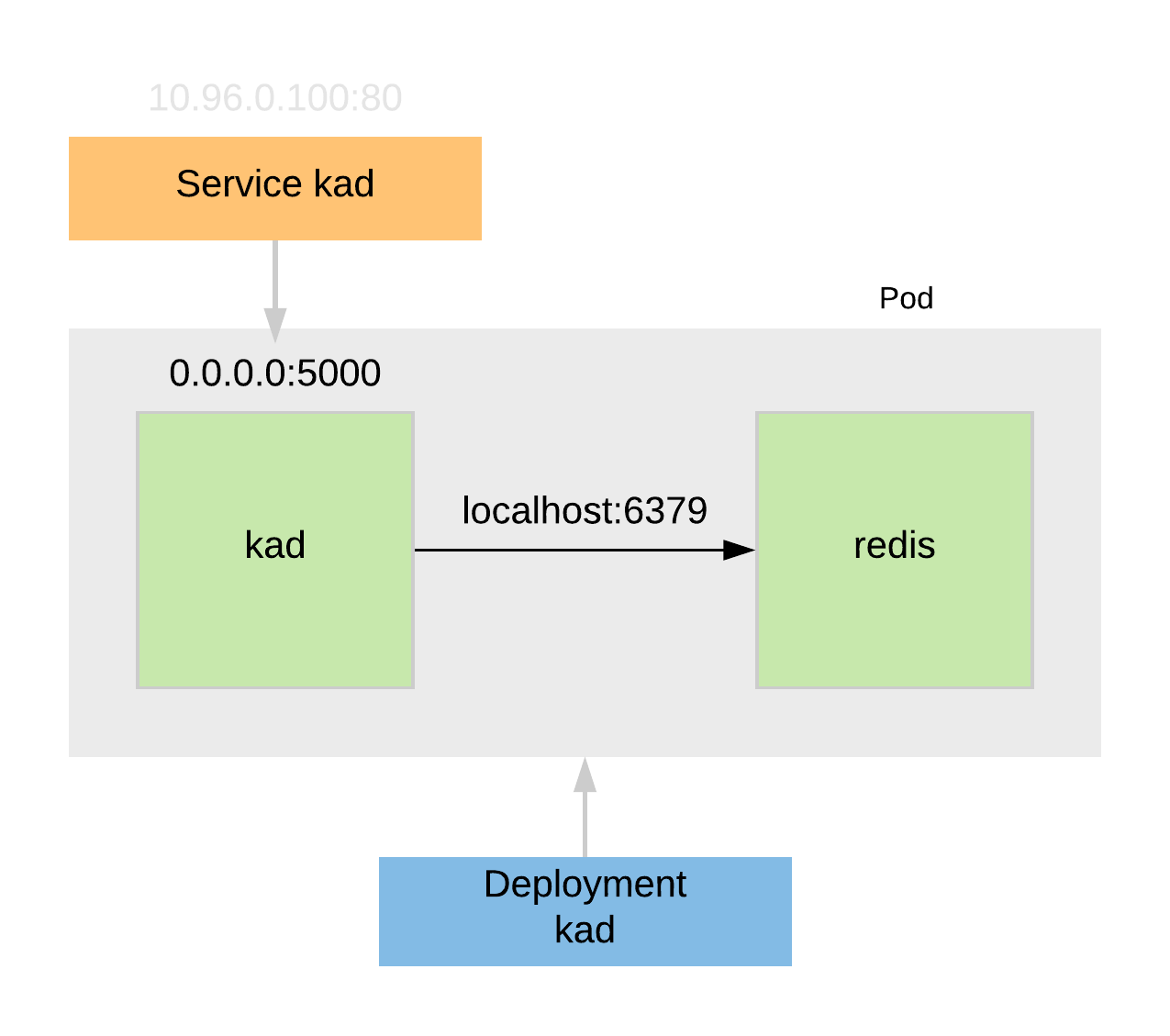 ]] ] .lc[ We will use [kad](https://gitlab.com/tomkukral/kad) and deploy it to Kubernetes cluster. 1. Create namespace `kadsingle` 1. Create service called `kad` * type of service is `type: ClusterIP` 1. Create deployment called `kad` * pod containing two containers: kad, redis * use image [tomkukral/kad](https://hub.docker.com/r/tomkukral/kad/) 1. Check all pods are running 1. Use `kubectl proxy` or NodePort to access web UI Reference can be found in `app_v4` ] --- # Lab - configure kad (2/2) We will add configuration to kad via environment variables and configuration files. 1. Create configMap with this `data` section: ```yaml filecontent: | abc: 123 password: {{ username }} color: red ``` 1. Mount `config.yml` to `/etc/kad` so path will be `/etc/kad/config.yml` 1. Read `color` and expose it as `$COLOR` variable 1. Change container command to run `/bin/kad --color red` and read `red` from configMap --- # Lab - deploy kad - scalable .rc[ .center[.full[ 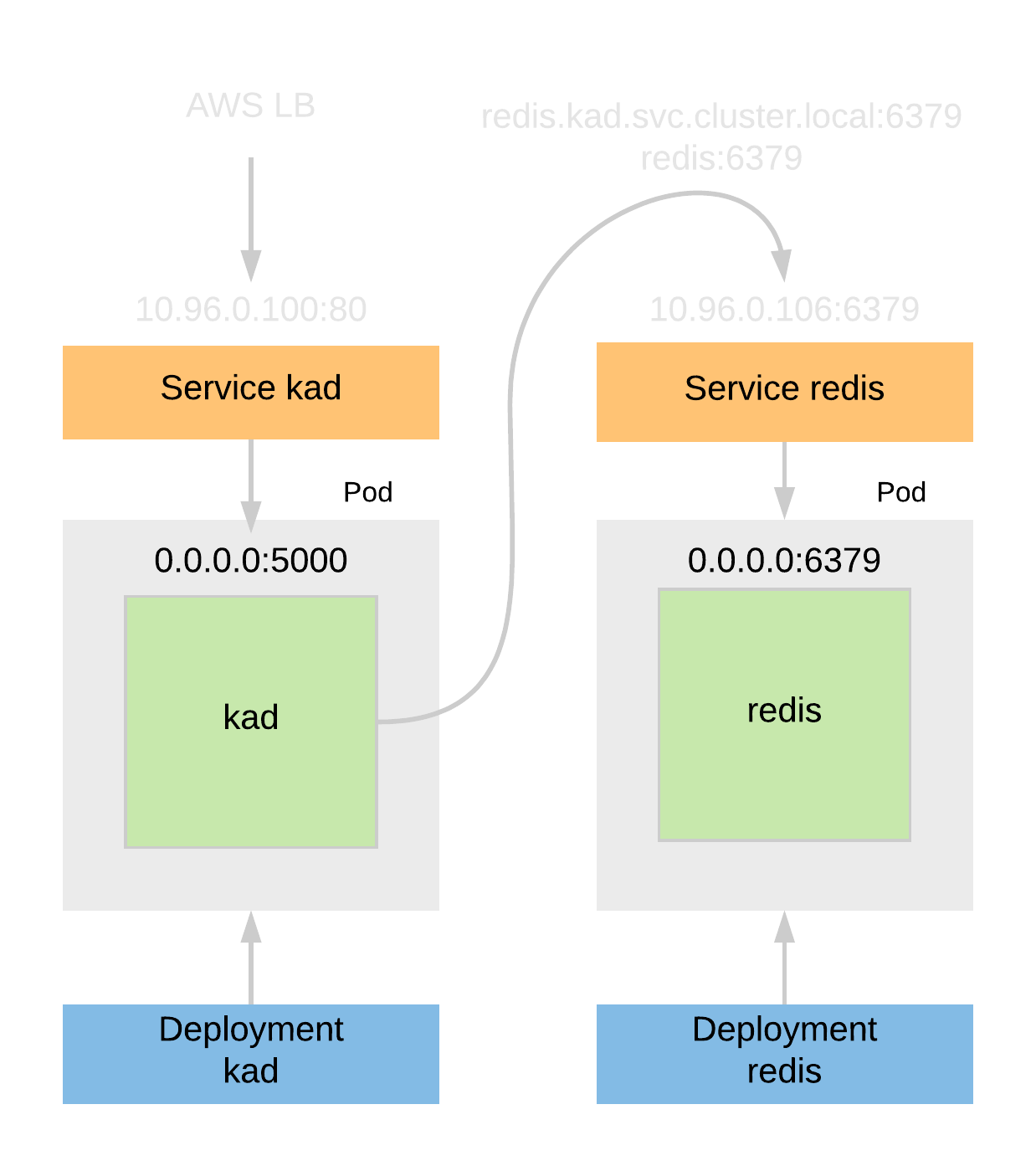 ]] ] We will use `kad` and deploy it to Kubernetes cluster. 1. Create namespace `kad` 1. Create service called `kad` * type of service is `type: LoadBalancer` 1. Create service called `redis` * type of service is `type: ClusterIP` 1. Create deployment called `kad` * containing one containers: kad * use image [tomkukral/kad](https://hub.docker.com/r/tomkukral/kad/) * don't forget to set `REDIS_SERVER` variable 1. Create deployment called `redis` * run single pod with container from `redis` image 1. Check all pods are running 1. Use NodePort to access web UI --- ## Resource allocation .left-column[ Resources can (must) specify how much CPU and memory each container needs and is allowed to use. * CPU is defined in cpu units. `0.5`, `500m` * Memory is defined in bytes. `128974848`, `129e6`, `129M`, `123Mi` * `requests` is useful for scheduler * `limits` is passed to the container runtime Don't run containers with unknown resources. ] .right-column[ ```yaml containers: - name: app image: docker.io/tomkukral/kad resources: requests: memory: "64Mi" cpu: "250m" limits: memory: "128Mi" cpu: "500m" ``` ] ??? requsts.cpu: --cpu-shares limits.memory: --memory --- # Lab - add resource to kad 1. Update `kad` deployment and add resources to each container 1. Set `requests.cpu: 50` and wait for pod restart 1. Is the pod running? Use `describe` to get state 1. Set `requests.cpu: 100m` and `limits.memory: 1Mi` 1. Increase `limits.memory` to `3Mi` 1. Set `limits.memory: 4Mi` for `kad` container 1. Create some load on `kad` until you see `OOMKilled` 1. Change resources back to reasonable numbers --- ## Monitoring - liveness, readiness Probes provides information about state (business logic) of containers by Kubelet code constantly checking container state. * **Liveness** - container is running Failing liveness probe triggers container restart * **Readiness** - container is ready to serve traffic Failing readiness probe will cause container endpoint to be removed from service * **Startup** - container is have started Pauses other probes until this one passes Probe types: * exec * httpGet * tcpSocket * [API reference](https://kubernetes.io/docs/reference/generated/kubernetes-api/v{{ kubernetes_version_short }}/#probe-v1-core) --- ### Probe definition .lc[ ```yaml livenessProbe: initialDelaySeconds: 10 periodSeconds: 30 timeoutSeconds: 5 tcpSocket: port: 6379 ``` ] .rc[ ```yaml readinessProbe: successThreshold: 1 exec: command: - "cat" - "/tmp/ready" ``` ] * `initialDelaySeconds`, `timeoutSeconds`, `periodSeconds` * `failureThreshold`, `successThreshold` ```yaml readinessProbe: httpGet: # host: default to pod IP path: /check/ready port: 5001 ``` --- # Lab - add probes to kad .lc[ Update `kad` by adding these probes to containers: * add `liveness` probe to kad container * update `liveness` probe to make it fail * fix `liveness` probe to make it working * add `readiness` probe to kad container * update `readiness` probe to make it fail * fix `readiness` probe to make it working Examples can be found in `app_v7`. ] .rc[ ```yaml resources: limits: cpu: 100m memory: 32Mi livenessProbe: httpGet: path: /check/live port: 5000 periodSeconds: 30 readinessProbe: httpGet: path: /check/ready port: 5001 periodSeconds: 5 ``` ] --- ## Cluster DNS - CoreDNS, DNS discovery Kube-DNS provide and records for resources: * `{{ service }}.{{ namespaces }}.svc.cluster.local` * `{{ pod-ip-dashed }}.{{ namespaces }}.svc.cluster.local` * `{{ pod-name }}.{{ sts-name }}.{{ namespace }}.svc.cluster.local` * `kubernetes.default.svc.cluster.local` DNS server isn't part of Kubernetes so it's your decision to use and configure it. * kube-dns - using patched dnsmasq, 3 containers, heavy and unreliable * [CoreDNS](https://coredns.io/) - 1 container, Kubernetes plugin, many options, based on [Caddy](https://caddyserver.com/) --- ## Discovery environment variables ```bash KAD_PORT_80_TCP_ADDR=10.96.0.2 KAD_PORT_80_TCP_PORT=80 KAD_PORT_80_TCP_PROTO=tcp KAD_PORT_80_TCP=tcp://10.96.0.2:80 KAD_PORT=tcp://10.96.0.2:80 KAD_SERVICE_HOST=10.96.0.2 KAD_SERVICE_PORT=80 KUBERNETES_PORT_443_TCP_ADDR=10.96.0.1 KUBERNETES_PORT_443_TCP_PORT=443 KUBERNETES_PORT_443_TCP_PROTO=tcp KUBERNETES_PORT_443_TCP=tcp://10.96.0.1:443 KUBERNETES_PORT=tcp://10.96.0.1:443 KUBERNETES_SERVICE_HOST=10.96.0.1 KUBERNETES_SERVICE_PORT=443 KUBERNETES_SERVICE_PORT_HTTPS=443 ``` * can be disabled with `enableServiceLinks: false` in pod spec --- ## Hooks and init containers Hooks allows to execute actions during container lifetime. Hooks are executed **at least once**. * PostStart - after container is created. Asynchronous, before or after entrypoint * PreStop - before termination, synchronous * Exec - run command in pod * HTTP - send request to endpoint ```yaml containers: - name: kad image: docker.io/tomkukral/kad lifecycle: postStart: exec: command: ["sh", "-c", "date > /tmp/started"] preStop: httpGet: path: "/action/token-invalidate" port: 5001 ``` --- ### Init container Init containers are started sequentially before main container and each is required to terminate sucesfully. ```yaml initContainers: - name: check-connectivity image: tomkukral/nmap command: ["bash", "-c", "ping -c1 google.com"] containers: - name: kad image: docker.io/tomkukral/kad ``` * Don't forget to mount volumes and add env variables --- ## Automatic scaling (HPA) Horizontal pod autoscaler can scale deployments according to CPU load. * API + controller * requires [metrics-server](https://github.com/kubernetes-incubator/metrics-server) ```bash kubectl autoscale deployment kad --min=1 --max=5 --cpu-percent=80 ``` ```bash kubectl top pod --all-namespaces ``` --- ### Lab - Horizontal pod autoscaler 1. Metrics-server should be already deployed on your cluster 1. Use `kubectl autoscale` command or `app_v7/hpa.yml` to define horizontal autoscaling for `kad` deployment 1. Create some load on `kad`, `/heavy` endpoint can be used to generate more load 1. Generate enough load to scale `kad` up --- # Kubernetes architecture .center[.full[ 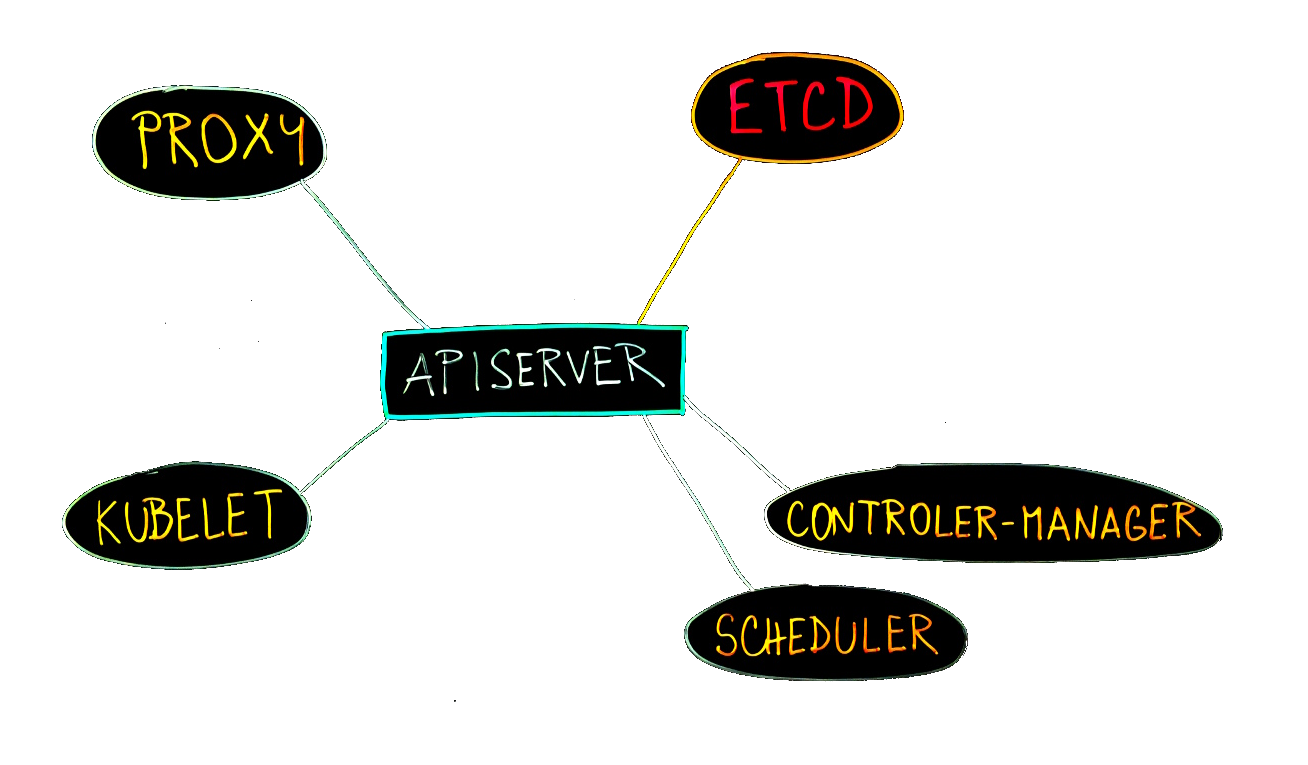 ]] --- ## etcd * [etcd-io/etcd](https://github.com/etcd-io/etcd) * [play.etcd.io](http://play.etcd.io/play) * key-value storage, distributed consistency * HTTP/GRPC API * publish, subscribe * TTL * Raft ([Understandable Distributed Consensus](http://thesecretlivesofdata.com/raft/)) * 10k writes/sec --- ## apiserver The Kubernetes API server validates and configures data for the api objects which include pods, services, deployments, and others. The API Server services REST operations and provides the frontend to the cluster’s shared state through which all other components interact. * [Reference](https://kubernetes.io/docs/reference/command-line-tools-reference/kube-apiserver/) ## scheduler The Kubernetes scheduler is a policy-rich, topology-aware, workload-specific function that significantly impacts availability, performance, and capacity. * [Reference](https://kubernetes.io/docs/reference/command-line-tools-reference/kube-scheduler/) --- ## controller-manager The Kubernetes controller manager is a daemon that embeds the **core control loops** shipped with Kubernetes. In Kubernetes, a controller is a control loop that watches the shared state of the cluster through the apiserver and makes changes attempting to move the current state towards the desired state. * [Reference](https://kubernetes.io/docs/reference/command-line-tools-reference/kube-controller-manager/) ## proxy The Kubernetes network proxy usually runs on each node. This reflects services as defined in the Kubernetes API on each node and can do simple TCP,UDP stream forwarding or round robin TCP,UDP forwarding across a set of backends. * [Reference](https://kubernetes.io/docs/reference/command-line-tools-reference/kube-proxy/) --- ## kubelet The kubelet is the primary **node agent** that runs on each node. The kubelet takes a set of PodSpecs that are provided through various mechanisms (primarily through the apiserver) and ensures that the containers (runtimes) described in those PodSpecs are running and healthy. The kubelet doesn’t manage containers which were not created by Kubernetes. * [Reference](https://kubernetes.io/docs/reference/command-line-tools-reference/kubelet/) --- ## Lab installation * terraform/tofu stack with shared [VPC](https://aws.amazon.com/vpc/) * Single node using [kubeadm](https://kubernetes.io/docs/setup/independent/create-cluster-kubeadm/) * Executed by custom [Ansible](https://www.ansible.com/) playbooks * Version {{ kubernetes_version }} * Configuration in `/etc/kubernetes/config.yml` * Kubeconfig in `/etc/kubernetes/admin.conf` * Kubernetes daemons rendered as static pods * `/etc/kubernetes/manifests/etcd.yaml` * `/etc/kubernetes/manifests/kube-apiserver.yaml` * `/etc/kubernetes/manifests/kube-controller-manager.yaml` * `/etc/kubernetes/manifests/kube-scheduler.yaml` * Kube-proxy is daemonset * CoreDNS scaled to 1 replica * [AWS cloudprovider](https://kubernetes.io/docs/concepts/cluster-administration/cloud-providers/#aws) * Cilium CNI --- ```bash kubectl get po,svc,deploy,ds,svc -n kube-system NAME READY STATUS RESTARTS AGE pod/calico-node-v9ws6 2/2 Running 0 9h pod/coredns-86c58d9df4-gbdd7 1/1 Running 0 9h pod/etcd-ip-10-0-0-10.eu-central-1.compute.internal 1/1 Running 0 9h pod/kube-apiserver-ip-10-0-0-10.eu-central-1.compute.internal 1/1 Running 0 9h pod/kube-controller-manager-ip-10-0-0-10.eu-central-1.compute.internal 1/1 Running 0 9h pod/kube-proxy-hppxl 1/1 Running 0 9h pod/kube-scheduler-ip-10-0-0-10.eu-central-1.compute.internal 1/1 Running 0 9h NAME TYPE CLUSTER-IP EXTERNAL-IP PORT(S) AGE service/calico-typha ClusterIP 10.96.0.129 <none> 5473/TCP 9h service/kube-dns ClusterIP 10.96.0.10 <none> 53/UDP,53/TCP,9153/TCP 9h NAME READY UP-TO-DATE AVAILABLE AGE deployment.extensions/calico-typha 0/0 0 0 9h deployment.extensions/coredns 1/1 1 1 9h NAME DESIRED UP-TO-DATE AVAILABLE NODE SELECTOR AGE daemonset.extensions/calico-node 1 1 1 beta.kubernetes.io/os=linux 9h daemonset.extensions/kube-proxy 1 1 1 <none> 9h ``` --- # Lab - scheduler log 1. Display scheduler log ```bash kubectl -n kube-system logs -f \ pod/kube-scheduler-ip-10-0-0-10.eu-central-1.compute.internal ``` 1. Create simple deployment with 3 replicas 1. Find scheduling actions in the log --- ## Node taints Taint - node can repel a set of pod * key: `node-role.kubernetes.io/master` * value: `""` * effect: `NoSchedule`, `PreferNoSchedule`, `NoExecute` ```bash kubectl taint nodes ip-10-0-10-10.eu-central-1.compute.internal \ node-role.kubernetes.io/master=:NoSchedule ``` * Remove taint: `kubectl taint nodes --all node-role.kubernetes.io/master-` * Pod can tolerate the taint: ```yaml tolerations: - key: node-role.kubernetes.io/master operator: Exists effect: NoSchedule ``` ??? * NoExecute triggers eviction, tolerationSeconds --- ## Node maintenance * `cordon` - disable scheduling new pods on this node ```bash NAME STATUS ROLES AGE VERSION node-0 Ready,SchedulingDisabled <none> 22h v{{ kubernetes_version }} ``` * `uncordon` - reenable scheduling * `drain` - cordon and move (delete + recreate) pods one by one * `--delete-emptydir-data` * `--ignore-daemonsets` --- ### External access We need to provide access to (some) services from external networks. * ClusterIP * changes each time svc is recreated * manual assignment is error prone and doesn't scale * NodePort * manual assignment * need for another proxy * limited to 30000-32767 by default * problems with port overlap * LoadBalancer * require external load balancer Solutions: * Proxy between cluster network and outside network * Public cluster network * Ingress controller --- ### Ingress Cluster network (pods and services) are routable only inside of cluster. Ingress is a tool to provide bridge (proxy) between cluster network and outside world. * available from 1.1 * Ingress controller Features: * Externally-reachable URLs * Traffic load balancing * SSL termination * Name based hosting * Certificate management --- ```yaml apiVersion: networking.k8s.io/v1 kind: Ingress metadata: name: minimal-ingress annotations: nginx.ingress.kubernetes.io/rewrite-target: / spec: ingressClassName: nginx-example rules: - http: paths: - path: /testpath pathType: Prefix backend: service: name: test port: number: 80 ``` --- .center[ .full[ 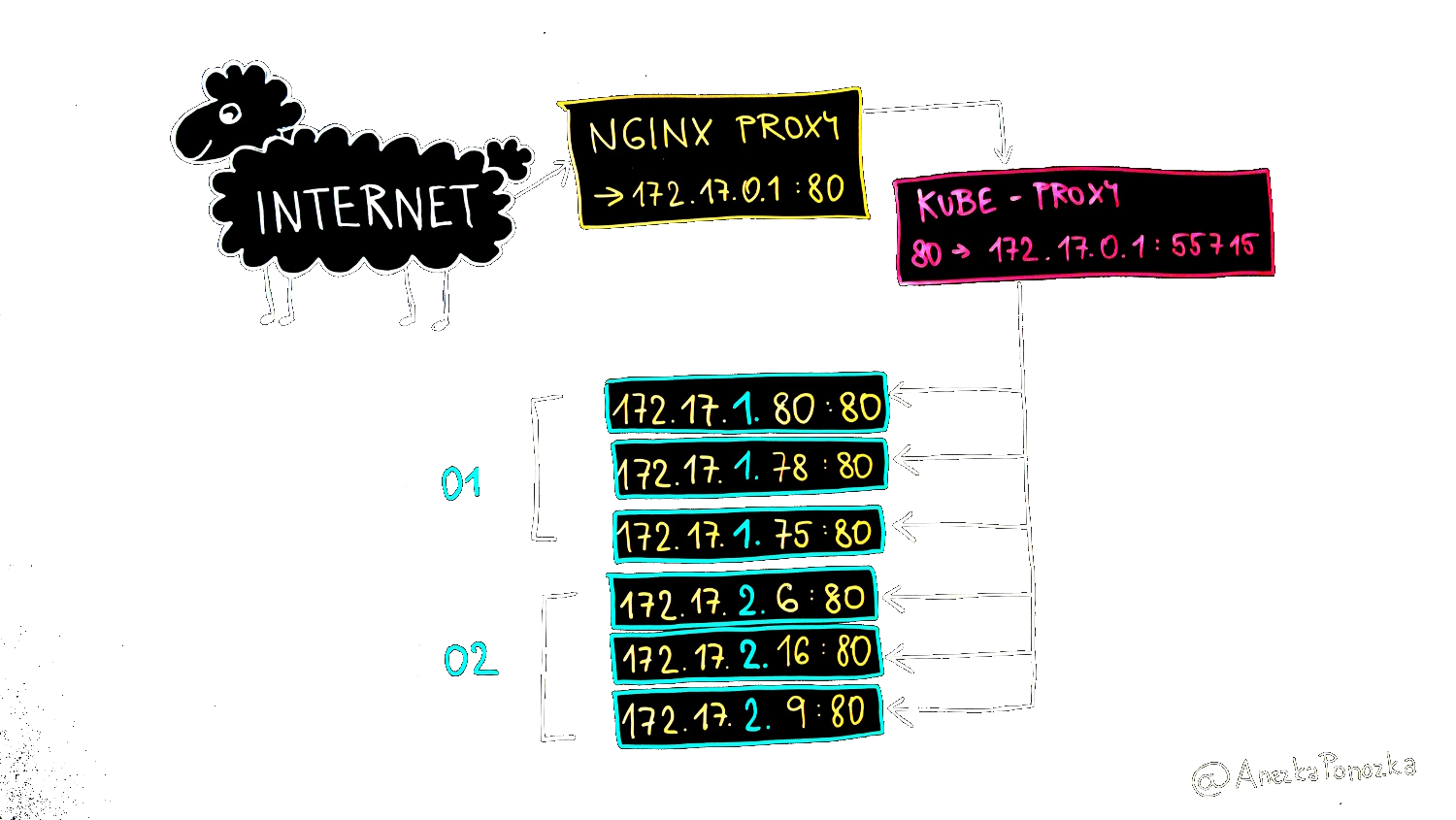 ]] --- ### Traefik * [containo.us/traefik](https://containo.us/traefik/), 1.7 vs 2.0 .center[ .full[ 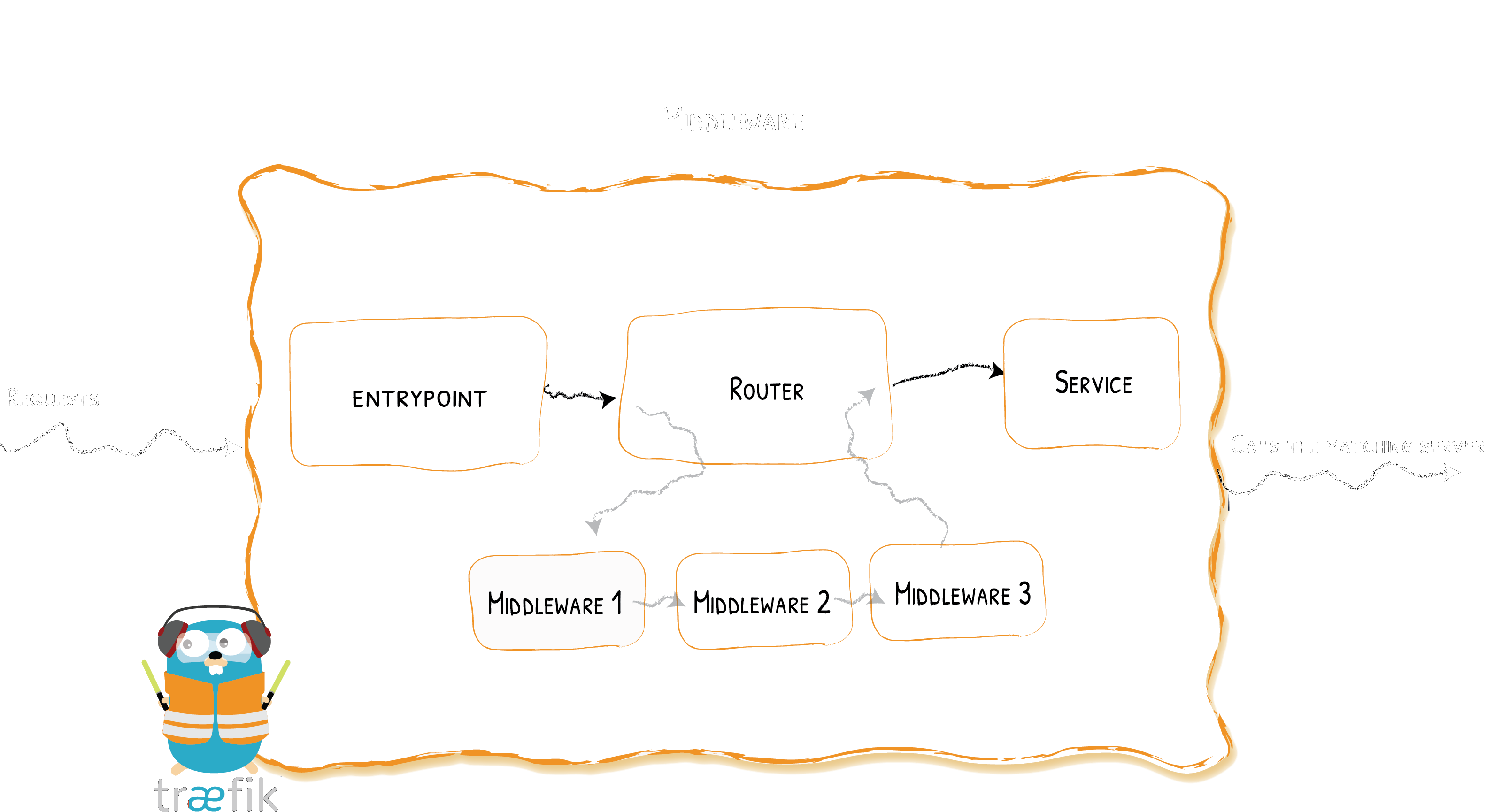 ]] --- .lc[ ```yaml apiVersion: traefik.containo.us/v1alpha1 kind: IngressRoute metadata: name: kad spec: entryPoints: - http - https routes: - match: HostRegexp("kad.{domain:.+}") kind: Rule services: - name: kad port: 80 ``` ] .rc[ ```yaml apiVersion: networking.k8s.io/v1 kind: Ingress metadata: name: kad spec: ingressClassName: nginx-example rules: - host: kad.c0.s8k.cz http: paths: - path: / pathType: Prefix backend: service: name: kad port: number: 80 ``` ] --- # Lab - traefik ingress 1. Check `traefik` for [traefik](https://traefik.io/) ingress controller which should be already deployed in `traefik` namespace. It's deployed from `traefik` directory. 1. Connect to admin interface at [traefik.c{{ N }}.s8k.cz/](http://traefik.cN.s8k.cz/) * username `glass` and password `paper` 1. Create `ingressRoute` resource to forward URL `kad.*` to `kad` service (previous slide) 1. Try to access `kad` via ingress on [kad.c{{ N }}.s8k.cz/](http://kad.cN.s8k.cz/). 1. Add [RateLimit middleware](https://docs.traefik.io/middlewares/ratelimit/) to limit access to 5 req/10 seconds. Example is in `ingress.yml`. 1. How is port 80 forwarded to ingress controller? --- ## Network policies .lc[ Specifies how group of pods can communicate with each other. `podSelector` defines which where (which pods) is this policy applied `policyTypes`: * `Ingress` - traffic entering the pod * `Egress` - traffic leaving the pod `to/from` rules * `podSelector` * `namespaceSelector` * `ipBlock` * [Visual editor](https://editor.cilium.io/) ] .rc[ ```yaml apiVersion: networking.k8s.io/v1 kind: NetworkPolicy metadata: name: redis namespace: kad spec: podSelector: matchLabels: app: redis policyTypes: - Ingress - Egress ingress: - from: - podSelector: matchLabels: app: kad ports: - protocol: TCP port: 6379 egress: [] ``` ] --- # Lab - Network policies 1. Access kad at [kad.c{{ N }}.s8k.cz](http://kad.cN.s8k.cz) 1. Add `NetworkPolicy` for redis to: * disable all outgoing traffic * allow access only from `kad` pod 1. Add `NetworkPolicy` for kad to work properly --- # Kustomize .lc[ Kubernetes manifest customization without templating. * Supported in `kubectl -k` * Sometimes problems with `kustomize` version in `kubectl` * Bases (deprecated) ] .rc[ ```yaml namespace: prometheus resources: - namespace.yml - rbac.yml - prometheus.yml - grafana.yml configMapGenerator: - name: prometheus-config files: - prometheus.yml=prometheus-config.yml generatorOptions: disableNameSuffixHash: false labels: generator: kustomize ``` ] --- # Prometheus monitoring * [Prometheus server](https://github.com/prometheus/prometheus) * scraping metrics from targets (`/metrics`) * simple web UI (port 9090) * PromQL query language * Alerts * [Alertmanager](https://github.com/prometheus/alertmanager) - alert evaluation and forwarding * [Node exporter](https://github.com/prometheus/node_exporter) - export node metrics * [Push gateway](https://github.com/prometheus/pushgateway) - store metrics for prom to scrape it * [Blackbox exporter](https://github.com/prometheus/blackbox_exporter) - Blackbox prober and exporter * Grafana dashboards --- ## Monitoring applications * Monitor from inside 1. Provide `/metrics` endpoint 1. Annotate application ```yaml metadata: annotations: `prometheus.io/scrape: 'true'` ``` --- # Lab - Running Prometheus 1. Deploy prometheus from `prometheus` directory: `kubectl apply -k prometheus/` 1. Connect to Prometheus on [http://prometheus.cN.s8k.cz](prometheus.cN.s8k.cz) * User: `glass`, password `paper` 1. Is everything `UP` (Status - Targets)? --- # Lab - Grafana for Prometheus .lc[ 1. Login to grafana on [http://grafana.cN.s8k.cz/](grafana.cN.s8k.cz) 1. Password change can be skipped 1. Import dashboard [1860](https://grafana.com/dashboards/1860) ] .rc[ .center[.full[ 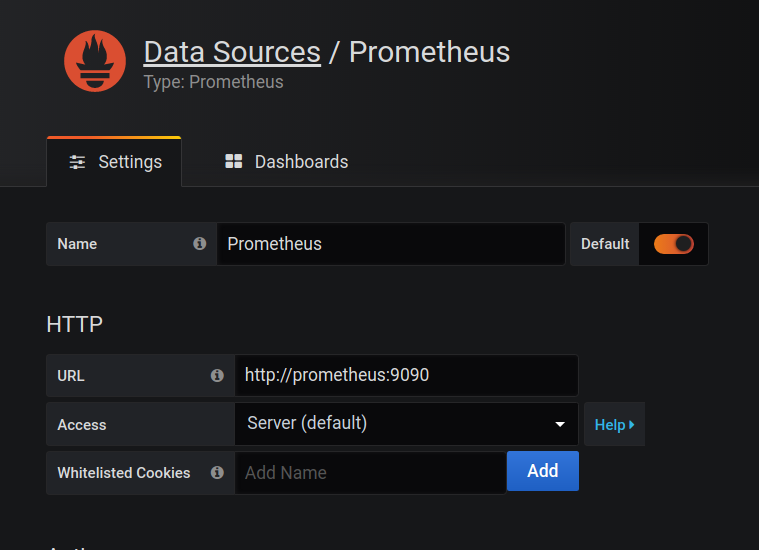 ]] ] --- ## Kubernetes service discovery Automatic discovery for services, nodes, pods, endpoint, ingress. .small[ ```yaml - job_name: 'kubernetes-services' scheme: https kubernetes_sd_configs: - role: `services` relabel_configs: - source_labels: [__meta_kubernetes_service_annotation_prometheus_io_scrape] action: keep regex: "true" ``` ```yaml kind: Service apiVersion: v1 metadata: annotations: prometheus.io/scrape: 'true' ``` ] --- # Lab - Monitoring kad with Prometheus 1. Add Prometheus scrape annotation to kad 1. Check targets page 1. Add graph for `page_hits` metrics --- ## Volumes and claims .rc[ ```yaml kind: PersistentVolumeClaim apiVersion: v1 metadata: `name: redis-data` spec: accessModes: - ReadWriteOnce resources: requests: storage: 1Gi ``` * `kubectl get pvc` ] .lc[ ```yaml apiVersion: apps/v1 kind: Deployment metadata: name: redis spec: selector: matchLabels: app: redis template: metadata: labels: app: redis spec: containers: - name: redis image: redis volumeMounts: - mountPath: "/data" name: redis-storage-volume volumes: - name: redis-storage-volume persistentVolumeClaim: `claimName: redis-data` ``` ] --- * Controller manager tries to bound `PersistentVolumeClaim` to `PersistentVolume` * `PersistentVolume` (`PV`) describes physical storage * `PV` can be created on demand ```yaml apiVersion: storage.k8s.io/v1 kind: StorageClass metadata: name: standard annotations: storageclass.kubernetes.io/is-default-class: "true" parameters: type: gp2 volumeBindingMode: Immediate provisioner: kubernetes.io/aws-ebs reclaimPolicy: Delete mountOptions: - debug ``` --- Persistent volume is mounted to kubernetes hosts (managed by `kubelet`) and then bind-mounted to container. Container have no knowledge about persistent volumes. ```bash /dev/nvme1n1 on /var/lib/kubelet/plugins/kubernetes.io/aws-ebs/mounts/aws/ eu-central-1c/vol-02a7be838f6422320 type ext4 (rw,relatime,debug,data=ordered) /dev/nvme1n1 on /var/lib/kubelet/pods/5d0041cd-e072-11e8-a727-0aa9e68cd28a/ volumes/kubernetes.io~aws-ebs/pvc-5cff79ca-e072-11e8-a727-0aa9e68cd28a type ext4 (rw,relatime,debug,data=ordered) ``` --- ```yaml apiVersion: storage.k8s.io/v1 kind: StorageClass metadata: annotations: storageclass.beta.kubernetes.io/is-default-class: "true" labels: addonmanager.kubernetes.io/mode: EnsureExists kubernetes.io/cluster-service: "true" name: standard resourceVersion: "229" parameters: type: pd-standard provisioner: kubernetes.io/gce-pd ``` --- # Moving app to Kubernetes * computes (processes) * storage * networking * Image naming (tags vs sha256 hash) * Health check (startup, readiness, liveness) * Start and stop, `terminationGracePeriodSeconds` * Metrics reporting * Event reporting * Port information * Dedicated private port * Cluster aware --- * Infrastructure agnostic * Avoid persistent filesystem * Expect security (volumeMount, id 0, drop capabilities, security context, hostPath, docker socket) * Backup vs redeploy * External resources * RBAC for users and apps * Registry availability/throughput * Serial pulls in kubelet --- * Patterns * Sidecar * Blue/green * Canary (die or not?) * Deployment * StatefulSet * DaemonSet * Multiple deployments --- Version {{ kubernetes_version }} --- # Helm * Text based templating * *Chart* - package (Kubernetes manifests) * *Release* * *Repository* - instantiated package * Autogenerated names * Go templates * [Sprig](https://github.com/Masterminds/sprig) support --- ``` helm repo add 6shore.net https://fi.6shore.net/helm helm repo update helm search repo helm install helm upgrade --create-namespace --namespace kad --install kad-1 6shore.net/kad helm status helm template kad-0 6shore.net/kad --set replicas=4 helm uninstall kad-0 ``` * Own repository recommended * `values.yml` override --- ## Lab - Creating own helm chart .rc[ 1. Create `kad` helm chart 1. Add custom `datascript.cz/course` with default value `kubernetes` Example is in * [gitlab.com/6shore.net/kad/](https://gitlab.com/6shore.net/kad/-/tree/master/helm) * `/root/kad/helm` ] .lc[ ``` ├── Chart.yaml ├── templates │ ├── deploy.yml │ ├── fallback.yml │ ├── ingress.yml │ └── rbac.yml └── values.yaml helm create kad helm lint . ``` ] --- ## Using repository * Public vs private ``` helm package . helm repo index . --url https://fi.6shore.net/helm/ --merge index.yaml mc cp index.yaml obj/static/fi.6shore.net/helm/ mc cp *.tgz obj/static/fi.6shore.net/helm/ rm -v *.tgz ``` * Gitlab packages support * Github pages * Any HTTP server --- ## Role-based access control - RBAC, Identities * from 1.6, stable 1.8 * Authorized operations on resources * __Operations__: create, get, delete, list, update, edit, watch, exec, ... * __Resources__: pods, volumes, nodes, secrets, ... * not applied on unsecure port! * Rule: operation (verb) on resource(s) * Role and ClusterRole: group of rules * Subject: * User - outside * ServiceAccount - internal * Group - multiple accounts * RoleBinding, ClusterRoleBinding: bind subject to roles * Role verification ```bash kubectl auth can-i ... ``` --- .lc[ ```yaml apiVersion: rbac.authorization.k8s.io/v1 kind: Role metadata: namespace: default name: pod-reader rules: - apiGroups: [""] resources: ["pods"] verbs: ["get", "watch", "list"] ``` ```yaml apiVersion: rbac.authorization.k8s.io/v1 kind: ClusterRole metadata: name: secrets-manager rules: - apiGroups: [""] resources: ["secrets"] verbs: ["get", "watch", "delete", "update"] ``` ] .rc[ ```yaml apiVersion: rbac.authorization.k8s.io/v1 kind: ClusterRoleBinding metadata: name: cluster-admin-tom subjects: - kind: User name: tom apiGroup: rbac.authorization.k8s.io roleRef: kind: ClusterRole name: cluster-admin apiGroup: rbac.authorization.k8s.io ``` ] --- ### Default resources * ClusterRoles * `system:basic-user` - information about users (self) * `cluster:admin` - superadmin access, binding to `system:masters` group * `admin` - namespaced, using RoleBinding * `edit` - edit resources, except roles and rolebindings * `view` - view resources, except roles, binding and secrets * Core roles * `system:kube-scheduler` - `system:kube-scheduler` user * `system:controller-manager` - `system:controller-manager` user * `system:node` - no binding * `system:node-proxier` - `system:kube-proxy` user * Component roles * `system:kube-dns` * `system:persitent-volume-provisioner` --- ### ServiceAccount * provides identity to pods * no permissions by default for workload * default service account in each namespace * secrets in `/var/run/secrets/kubernetes.io/serviceaccount` * can be disabled by `spec.automountServiceAccountToken: false` --- ```yaml apiVersion: v1 kind: ServiceAccount metadata: name: `default` namespace: kad ``` ```yaml apiVersion: rbac.authorization.k8s.io/v1 kind: ClusterRoleBinding metadata: name: kad-sa-admin roleRef: apiGroup: rbac.authorization.k8s.io kind: ClusterRole name: cluster-admin subjects: - kind: ServiceAccount name: `default` namespace: kad ``` --- ### Lab - RBAC 1. Verify nodes are `Ready` 1. Try to delete some pods and wait for them to start 1. Find `kubeconfig` files for users in `/etc/kubernetes/users`. `admin`, `manager`, `developer`, and `monitoring` should be present. 1. Try to access cluster using admin kubeconfig (`--kubeconfig`) 1. Why is admin able to access cluster? 1. Try to access cluster using developer account 1. Create `dev` namespaces 1. Assign `admin` role to `developer` user in `dev` namespace 1. Can `manager` edit deployments in `dev` namespace? 1. Can `developer` view secrets? 1. Can `manager` view secrets? 1. Allow `developer` user to view resources in `default` namespace --- Assign `admin` role in namespace `dev` to user `developer` user ```yaml kind: RoleBinding apiVersion: rbac.authorization.k8s.io/v1 metadata: name: developer-admin-in-dev namespace: `dev` subjects: - kind: User name: `developer` apiGroup: rbac.authorization.k8s.io roleRef: kind: ClusterRole name: `admin` apiGroup: rbac.authorization.k8s.io ``` --- Assign `view` role in namespace `dev` to `manager` user ```yaml kind: RoleBinding apiVersion: rbac.authorization.k8s.io/v1 metadata: name: manager-view-in-dev namespace: `dev` subjects: - kind: User name: `manager` apiGroup: rbac.authorization.k8s.io roleRef: kind: ClusterRole name: `view` apiGroup: rbac.authorization.k8s.io ```